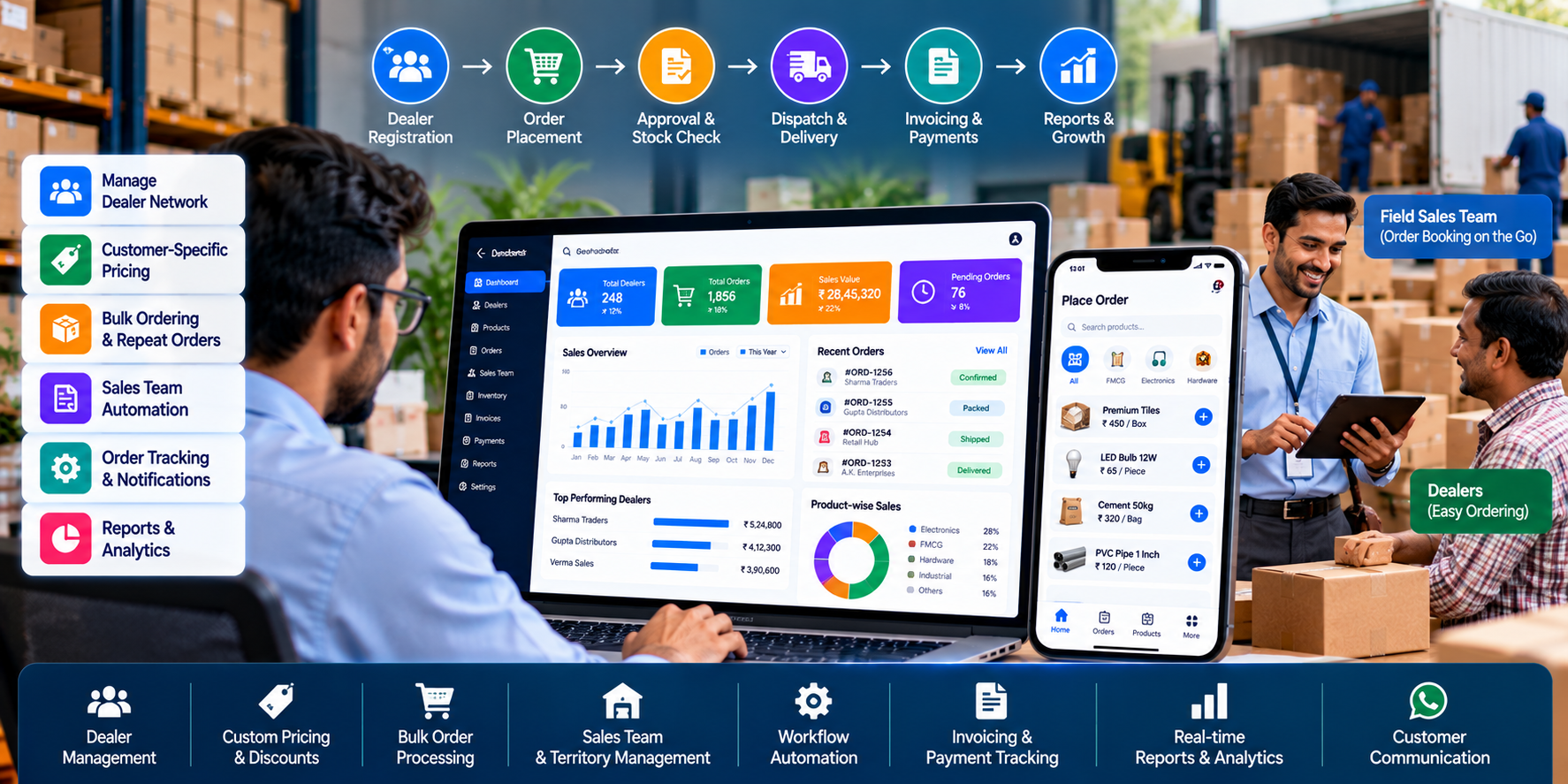
Dealer Order Management Software: How to Automate Dealer Orders and Sales Operations
Distributors often manage dozens or hundreds of dealers, retailers and business customers. Every day, their teams may handle product enquiries, price requests, order bookings, stock confirmations, invoices, payments and delivery updates.
When these activities depend on phone calls, WhatsApp messages, spreadsheets and manual data entry, managing a growing distribution network becomes increasingly difficult.
An order may be missed in a busy WhatsApp conversation. A salesperson may share an outdated price. An employee may enter the same order twice, or a dealer may need to call repeatedly to check delivery status.
These challenges can slow down operations and make it harder for management to understand sales performance.
Dealer order management software helps businesses organize dealer accounts, sales orders, pricing, approvals and order tracking in a centralized system. When connected with accounting, inventory and communication tools, it can reduce repetitive work and improve operational visibility.
Cycode Technologies provides software development, ERP, e-commerce and business automation solutions that businesses can explore when planning their digital sales workflows.
In this guide, we explain how distributors can automate dealer orders, improve sales team productivity and build a more connected distribution operation.
What Is Dealer Order Management Software?
Dealer order management software is a digital system that helps manufacturers, wholesalers and distributors manage orders received from their dealers and business customers.
Instead of relying entirely on manual communication, the business can record orders through a centralized platform and track them through defined stages.
Depending on the implementation, the system may include:
- Dealer registration and account management.
- Product catalogues and dealer-specific pricing.
- Sales order creation and approval.
- Bulk ordering and repeat orders.
- Order status tracking.
- Salesperson and territory management.
- Invoice and payment records.
- Customer communication and notifications.
- Sales reports and performance dashboards.
- Integration with inventory, accounting and ERP systems.
A small distributor may need a simple order-entry and reporting system. A larger organization may require a complete distribution management platform with a dealer portal, mobile applications, field sales management and multi-location operations.
The right solution depends on how the company receives orders, manages dealers, processes payments and fulfils deliveries.
Common Problems in Manual Dealer Order Management
Before automating a process, it is important to understand where the current workflow creates delays or errors.
1. Orders Are Scattered Across Different Channels
Dealers may place orders through phone calls, WhatsApp messages, email or directly through sales representatives.
Employees then need to collect this information and enter it into another system. Important order details can be overlooked, and tracking the latest version becomes difficult.
A centralized order workflow helps bring these transactions together.
2. Salespeople Spend Too Much Time on Administration
Field sales representatives may spend a significant portion of their day recording orders, checking prices, preparing reports and following up on pending transactions.
Sales automation can reduce repetitive administrative work, allowing employees to spend more time visiting customers and developing business relationships.
3. Dealers Have Limited Order Visibility
Without a structured order tracking process, dealers may need to call the distributor to confirm whether an order has been received, approved, packed or dispatched.
A dealer portal or suitable notification workflow can make order status easier to access.
4. Pricing Errors Create Confusion
Different dealers may have different discount structures, negotiated prices, product rates or payment terms.
When employees maintain these details manually, outdated information or incorrect calculations can lead to disputes.
A centralized pricing system can apply defined rules consistently, with appropriate approval controls for special prices and discounts.
5. Sales Reporting Takes Too Long
Management may have to combine multiple spreadsheets to understand which dealers are active, which salespeople are performing well and which orders remain pending.
A centralized system can provide reports based on recorded transactions, reducing the need for repeated manual compilation.
6. Follow-Ups Are Often Missed
Sales representatives may need to follow up on quotations, pending orders, outstanding payments or inactive dealers.
A sales management system can record follow-up tasks and reminders so that important activities are less dependent on individual memory.
10 Ways to Automate Dealer Orders and Sales Operations
1. Create a Centralized Dealer Database
The first step is to organize dealer information in one place.
A dealer database can store:
- Business name and contact details.
- Assigned salesperson or territory.
- Product categories handled.
- Applicable pricing group.
- Credit terms, where approved.
- Order history.
- Communication and follow-up records.
- Payment information from connected financial records.
This helps employees find the information they need without searching through multiple files and conversations.
Access to sensitive financial and commercial details should be restricted according to user roles.
2. Introduce a Digital Dealer Ordering Portal
A dealer ordering portal allows approved customers to place orders through a website or supported mobile interface.
Depending on the business requirements, dealers may be able to:
- Browse product catalogues.
- View applicable prices.
- Enter bulk quantities.
- Place repeat orders.
- Submit special requests.
- Review previous orders.
- Track order status.
- Access relevant invoices and documents.
The portal can reduce dependence on manual order collection and make the buying process more convenient for dealers.
For businesses that need a fully customized solution, the portal can be integrated with existing order processing, billing and ERP workflows.
3. Automate Sales Order Creation
Once an order is received, the system can create a structured sales order containing the relevant product, quantity, customer and delivery information.
A defined workflow can move the order through stages such as:
- Order received.
- Order validation.
- Price and discount verification.
- Stock availability check.
- Approval, if required.
- Processing and dispatch.
- Delivery confirmation.
- Invoice and payment follow-up.
Not every order needs every stage. The workflow should reflect the distributor's actual operating procedures.
Automated validation can catch missing information or unauthorized pricing changes before the order progresses.
4. Configure Dealer-Specific Pricing and Discounts
Distributors frequently serve customers with different commercial agreements.
A sales automation system can support configurable pricing based on dealer category, product, order quantity or approved contract terms.
For example, a distributor may have different pricing rules for retailers, wholesalers and high-volume dealers.
The system should clearly define how discounts, taxes, special offers and price overrides interact. Any exceptional discount can be routed for approval where necessary.
This reduces the risk of employees applying inconsistent prices or granting unauthorized discounts.
5. Connect Orders With Inventory and Billing
Order management becomes more effective when it is connected to stock records and billing workflows.
A connected system may help employees verify availability, generate invoices through the configured process and maintain consistent transaction records.
For example, when a dealer places an order, the software can check available stock before allowing confirmation or route the order for review if quantities are insufficient.
The exact process for reserving stock, invoicing, dispatching and handling returns should be defined during implementation.
For more complex operations, an integrated ERP can connect order management with purchasing, accounting and other business functions.
6. Automate Dealer Notifications and Communication
Dealers often need updates about order confirmation, dispatch, delivery and payment status.
A business can configure notifications through supported channels such as email, SMS or WhatsApp, depending on available integrations and platform requirements.
Useful notifications may include:
- Order received.
- Order approved.
- Product unavailable or order partially fulfilled.
- Invoice generated.
- Order dispatched.
- Payment reminder.
- Special offer or product announcement, where appropriate.
Notifications should be relevant, accurate and sent according to the customer's communication preferences and applicable rules.
Automating routine updates can reduce repetitive calls while keeping dealers informed.
7. Equip Field Sales Representatives With Digital Tools
Field sales teams often visit dealers to collect orders, introduce products, review demand and maintain relationships.
A sales force automation system can give representatives access to relevant customer and product information through a mobile-friendly application or interface.
Potential features include:
- Dealer visit records.
- Order booking.
- Product catalogue access.
- Sales targets.
- Follow-up reminders.
- Customer purchase history.
- Territory assignments.
- Sales reports.
- Visit notes and next actions.
Where location-based attendance or route features are required, they should be designed with suitable permissions and clear operational policies.
The aim is to help sales representatives work more efficiently, not to add unnecessary administrative tasks.
8. Automate Payment Follow-Ups
For distributors that offer approved credit terms, payment collection is an important part of daily operations.
A connected system can help track invoice due dates, outstanding balances and follow-up activities when reliable financial records are available.
Employees may receive reminders about overdue accounts, while authorized users can review customer payment history.
Payment reminders should reflect actual invoice status. A system should not mark an invoice as unpaid if the payment has already been received but not yet reconciled.
For more advanced workflows, accounting integration can help align order records with invoices, receipts and customer ledgers.
9. Build Sales Dashboards and Performance Reports
Managers need to understand how the distribution network is performing.
A centralized system can produce reports based on recorded transactions, such as:
- Sales by dealer.
- Sales by representative.
- Territory-wise sales.
- Product-wise sales.
- Orders received and fulfilled.
- Pending orders.
- Cancelled orders.
- Repeat-purchase activity.
- Outstanding invoices, where integrated.
- Target versus actual sales.
Dashboards help management identify trends, review performance and investigate operational bottlenecks.
Reports should use clearly defined metrics so that employees and managers interpret the results consistently.
10. Automate Reordering and Dealer Follow-Ups
Repeat orders are common in distribution businesses. Customers may regularly purchase the same products at predictable intervals.
A system can help identify dealers who have not ordered recently, products that are frequently reordered or customers whose purchasing activity has changed.
Based on these records, the sales team can schedule follow-ups or suggest replenishment orders.
More advanced systems may use historical demand to support forecasting, but forecasts should be treated as estimates rather than guarantees of future demand.
Dealer Order Management Software vs. Manual Order Processing
| Business Activity | Manual Process | Automated Workflow |
|---|---|---|
| Dealer information | Multiple spreadsheets | Centralized customer records |
| Order collection | Calls and messages | Structured order entry |
| Pricing | Manual checking | Configured pricing rules |
| Order status | Calls and individual follow-ups | Centralized tracking |
| Stock verification | Separate manual checks | Connected stock validation, where integrated |
| Invoicing | Repeated data entry | Linked billing workflow |
| Sales reporting | Manual compilation | Configured reports and dashboards |
| Payment follow-ups | Individual reminders | Due-date reminders based on financial records |
| Dealer communication | Repetitive manual updates | Configured notifications |
| Sales activity | Paper notes or spreadsheets | Digital visit and follow-up records |
Automation does not eliminate the need for employee oversight. It provides a more consistent process for recording, validating and tracking business activities.
Which Businesses Benefit Most From Sales Automation?
FMCG Distributors
FMCG distributors often handle frequent orders, multiple product categories and a large dealer network. Digital order entry and dealer-specific pricing can help organize these activities.
Food and Beverage Distributors
Businesses supplying packaged foods, beverages and other consumables may benefit from repeat ordering, product availability checks and organized delivery records.
Electronics and Hardware Distributors
These businesses may need extensive product catalogues, SKU-level tracking, variant handling and structured quotation workflows.
Agricultural Suppliers
Businesses supplying seeds, fertilizers, agricultural equipment or other farm-related products may benefit from dealer records, territory management and seasonal sales reporting.
Pharmaceutical and Healthcare Distributors
These businesses may require additional controls for batch tracking, expiry dates, traceability and industry-specific documentation. The software must be assessed against applicable requirements.
Industrial and Manufacturing Businesses
Manufacturers supplying distributors and dealers can use digital portals and order workflows to coordinate customer orders, product availability and fulfilment.
How to Choose the Right Distributor Management Software
Choosing software based only on the number of features can lead to unnecessary complexity. Evaluate the system against your actual business workflow.
- Map your current process. Document how orders arrive, how prices are confirmed, who approves transactions and how goods are dispatched.
- Identify the biggest bottlenecks. Determine whether the primary problem is order entry, dealer communication, field sales reporting, invoicing or payment follow-up.
- Define user roles. Identify what dealers, sales representatives, managers, accounts employees and administrators should be allowed to access.
- Check integration requirements. Confirm whether the software needs to connect with inventory, accounting, ERP, e-commerce or messaging systems.
- Evaluate mobile usability. Make sure employees and dealers can complete common tasks on the devices they actually use.
- Review reports and audit trails. Confirm that management can track important transactions, changes and approvals.
- Plan implementation and training. Prepare dealer records, product data, pricing rules and employee training before deployment.
- Start with priority workflows. Launch the most important functions first, then add advanced automation as the business becomes ready.
How Much Does Dealer Order Management Software Cost in India?
There is no single price for every distributor management system. Costs depend on the size of the business, required features and level of customization.
Important factors include:
- Number of dealers and internal users.
- Web portal and mobile application requirements.
- Product catalogue size.
- Pricing and discount complexity.
- Salesperson and territory management.
- Order approval workflows.
- Inventory and accounting integration.
- Messaging and notification integrations.
- Reporting and analytics.
- Data migration, hosting, training and ongoing support.
A business that needs dealer registration and digital order entry has different requirements from a company that needs a complete distribution ERP with field sales, accounting and advanced reporting.
Before selecting a solution, request a proposal that defines the modules, integration scope, implementation responsibilities and ongoing costs.
Common Mistakes When Automating Distribution Operations
Automating a Poorly Defined Process
Software cannot resolve every operational issue automatically. First define who receives orders, who approves pricing and how exceptions are handled.
Ignoring Dealer Adoption
A sophisticated system will provide limited value if dealers find it difficult to use. Keep the ordering process simple and provide clear onboarding instructions.
Maintaining Duplicate Records
Different names or codes for the same dealer or product can create reporting and billing inconsistencies. Establish data standards before migration.
Failing to Define Pricing Rules
Discount priorities, dealer categories, taxes and exceptional prices should be clearly documented and tested.
Overlooking Integration Errors
Connected systems can fail or receive duplicate requests. Define how failed transactions, retries and reconciliation will be handled.
Making Every Process Automatic
Some activities require human approval, particularly unusual discounts, credit exceptions, disputed returns and high-value transactions.
Neglecting Security
Dealer pricing, customer records and financial information require appropriate authentication, permissions, backups and audit logging.
How Cycode Technologies Can Help
Cycode Technologies provides software development and digital business solutions for organizations seeking to improve their operational workflows.
Depending on your requirements, you can explore:
- Custom dealer order management systems.
- Distributor and dealer portals.
- Sales force automation solutions.
- ERP and business management software.
- Inventory and billing integration.
- Mobile application development.
- API and third-party system integration.
- Workflow automation and reporting.
- Ongoing software development and technical support.
A solution can be scoped around the processes your business needs to improve, whether that means replacing manual order entry, creating a dealer portal or connecting sales operations with existing business software.
The final architecture, modules and integrations should be determined after reviewing your current systems and operational requirements.
Supporting Businesses Across India and International Markets
Digital sales and order management systems can support businesses operating across multiple regions.
Cycode Technologies can discuss software development and business automation requirements for organizations in Hansi, Hisar, Bhiwani, Bikaner, Tinsukia, Bengaluru and other locations across PAN India. Businesses operating in international markets, including Namibia, Nigeria and the USA, can also discuss their project needs.
The suitable implementation will depend on the business model, customer workflows, integrations and applicable requirements in each market.
Conclusion
Dealer order management and sales automation can help distributors organize customer records, streamline order processing, apply consistent pricing rules and improve communication with dealers.
The biggest benefits often come from connecting the processes that are currently handled separately: order booking, stock checks, invoicing, payment follow-ups and sales reporting.
Start by identifying where your team spends the most time on repetitive tasks or where errors occur most frequently. Then implement a solution that addresses those issues and can expand as the distribution network grows.
Want to automate dealer orders and sales operations? Contact Cycode Technologies to discuss custom software, distributor management, ERP integration and business automation solutions for your company.
Frequently Asked Questions (FAQs)
1. What is dealer order management software?
It is software that helps businesses manage dealer accounts, pricing, orders, approvals and order tracking through a centralized system.
2. Can distributors automate orders received through WhatsApp?
Depending on available integrations and the communication platform being used, businesses may be able to connect supported messaging workflows with their order management system. The exact process depends on the API, permissions and required automation.
3. Can dealer management software support different prices for different dealers?
Yes. It can be configured to apply dealer-specific prices, discount structures and approved commercial terms.
4. Can a distributor management system integrate with accounting software?
Yes, when compatible integration options are available. The integration can connect relevant customer, invoice, payment and sales records according to the agreed workflow.
5. Is a dealer portal necessary for order automation?
Not always. Some businesses can begin with an internal order management system. A dealer portal is useful when customers need to place orders, review order history or track progress independently.
6. Can sales representatives book orders through a mobile app?
Yes. A custom mobile application or mobile-friendly interface can support order booking, dealer information, product catalogues and follow-up activities.
7. Can the system track outstanding dealer payments?
It can display relevant outstanding balances and due dates when connected to reliable financial records and configured with suitable access controls.
8. How long does sales automation implementation take?
The timeline depends on the required modules, existing software, integrations, data migration and testing. Defining a clear first release helps establish a more realistic implementation plan.
9. Is sales automation suitable for small distributors?
Yes. Smaller distributors can begin with essential features such as dealer records, order entry, pricing and basic reporting, then add more advanced modules as their requirements grow.
10. Can Cycode Technologies develop a custom distributor management system?
Cycode Technologies provides software development and business technology services and can discuss the scope, modules, integrations and implementation requirements for a custom distributor management solution.